> ## Documentation Index
> Fetch the complete documentation index at: https://docs.corrily.com/llms.txt
> Use this file to discover all available pages before exploring further.
# Corrily Architecture
> Explore Corrily Platform components, Data Model and Control Flow.
## Architecture Overview
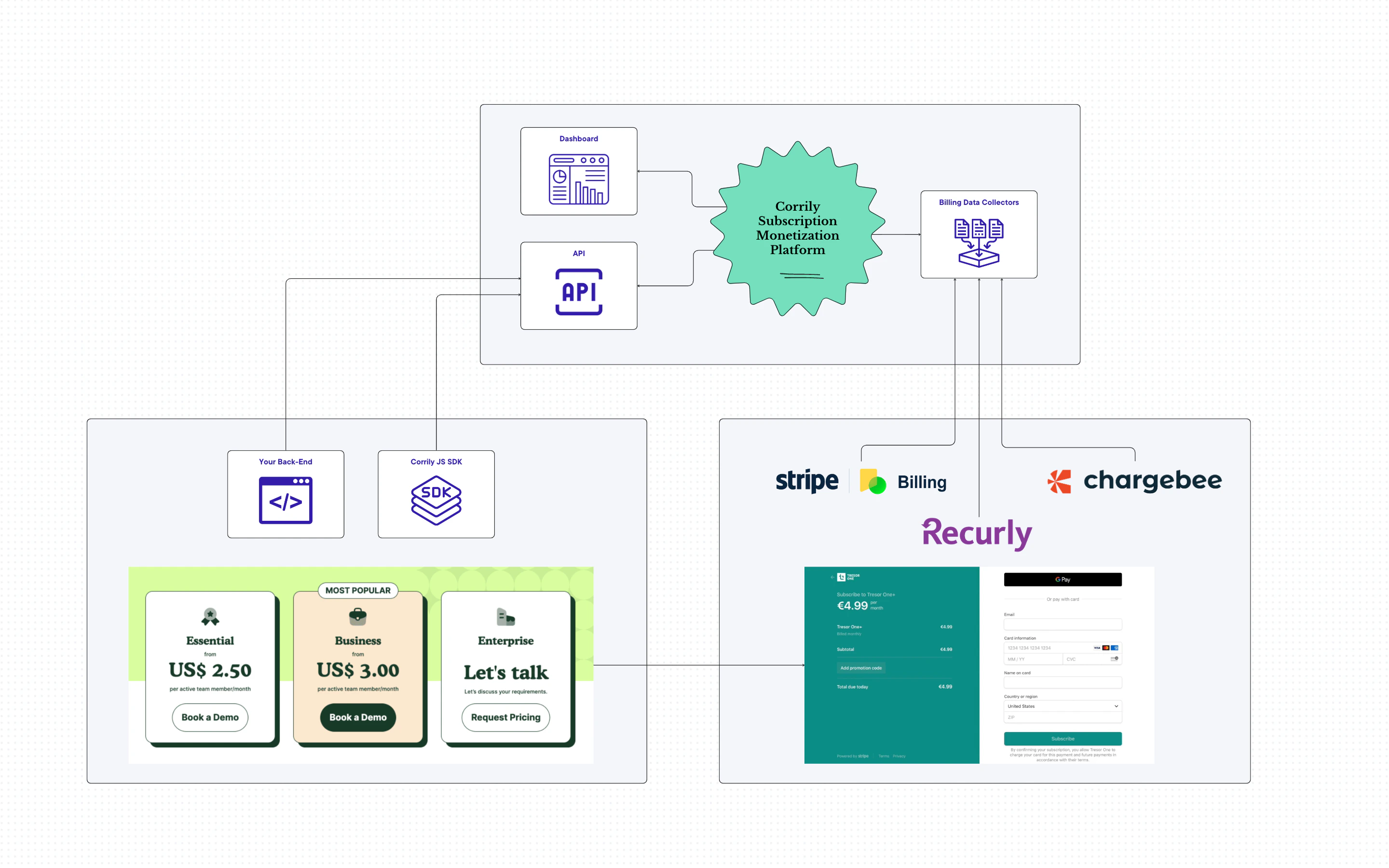
The Corrily Platform is designed to control and optimize almost every aspect of Pricing
and Monetization for subscription-based businesses. Its architecture consists of several key components,
including Pricing API, Analytics dashboard and Integrations.
### Paywall Builder
With Corrily, your pricing page becomes dynamic and remotely-configured, eliminating the need
for hardcoded prices. The content of the Pricing Page (including sets of plans to display, prices itself,
currencies, discounts, trial info, etc) will be fetched via API, which can be consumed either
by your back-end code or directly from the front-end or Mobile App using Corrily's SDKs.
That approach enables a personalized and dynamic pricing experience for each user.
### Price Management and Price Experimentation
Corrily serves as an external “admin panel” that controls your prices, acting
as a source of truth for pricing and monetization. It allows you to configure and immediately
apply every aspect of subscription monetization through the Corrily dashboard.
On each API call, the platform dynamically determines the country and audience of the User,
deciding if the User falls into an active experiment, and then responds with the appropriate
pricing page content for that User.
After displaying prices to the User, Corrily records the displayed values,
ensuring the User consistently encounters the same prices across the product and checkout pages,
and even on different platforms like on web or mobile app.
### Revenue Data Ingestion
To enable Corrily's analytics capabilities, it’s required to feed revenue events into the Corrily Platform
from your Subscription Management solution (Stripe Billing, Chargebee, Recurly or other).
Revenue events are typically fetched by Corrily itself using API Key or OAuth integration,
but it’s also possible to use Subscription Management Platform webhooks
or to feed revenue events using Corrily CRUD API.
In summary, the Corrily Platform architecture is designed to provide rich control
and optimization capabilities for different aspects of your pricing page.
By leveraging these components, you can create personalized pricing experiences for your users,
make data-driven decisions, and ultimately maximize revenue.
## Control Flow
There are typically multiple places where users could see or interact with your pricing page:
* **Anonymous pricing page**, publicly visible for unauthenticated website users or mobile app visitors
* **Internal Paywall or Customer Portal**, visible for signed users
* **Checkout Flow**, hosted by you, by subscription management platforms, or by IOS/Google Play
### Control Flow before Corrily
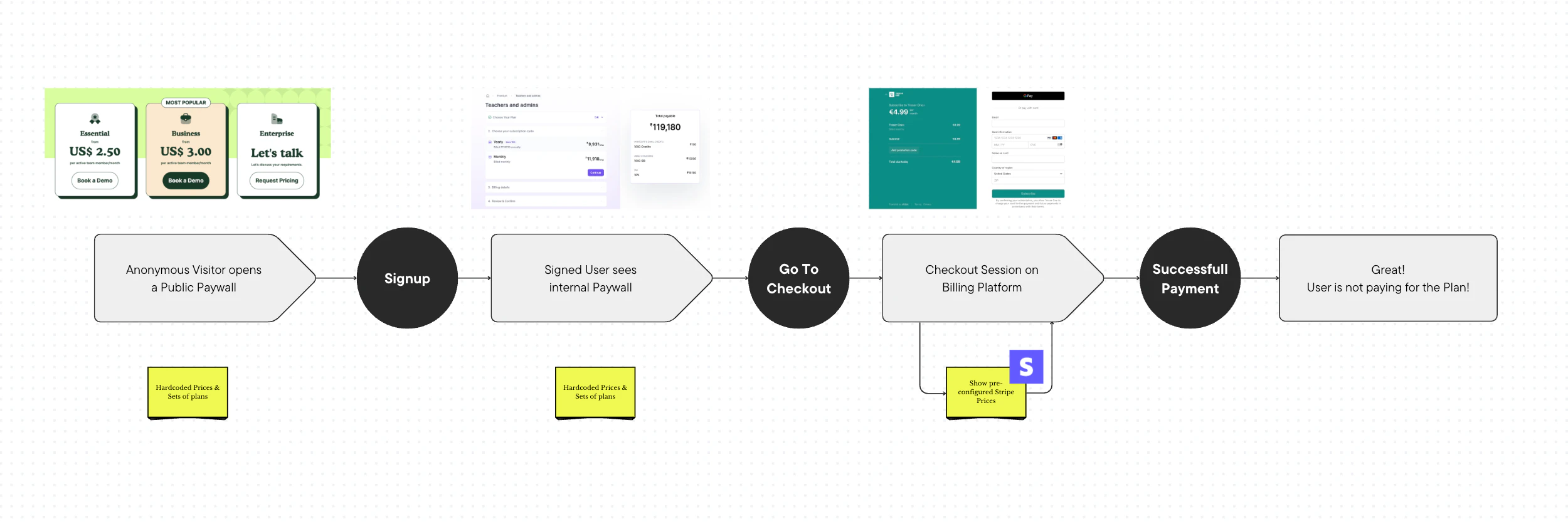
Before Corrily, companies typically use this simple setup:
* Paywall Plans and Prices are hardcoded on the front-end, or stored in the database
* Checkout prices are configured on the billing platform catalog
That means any update requires engineering effort, at least on the billing engineering side,
and, optionally, on front-end.
Also, that means there are risks of different types of inconsistencies.
### Control Flow with Corrily
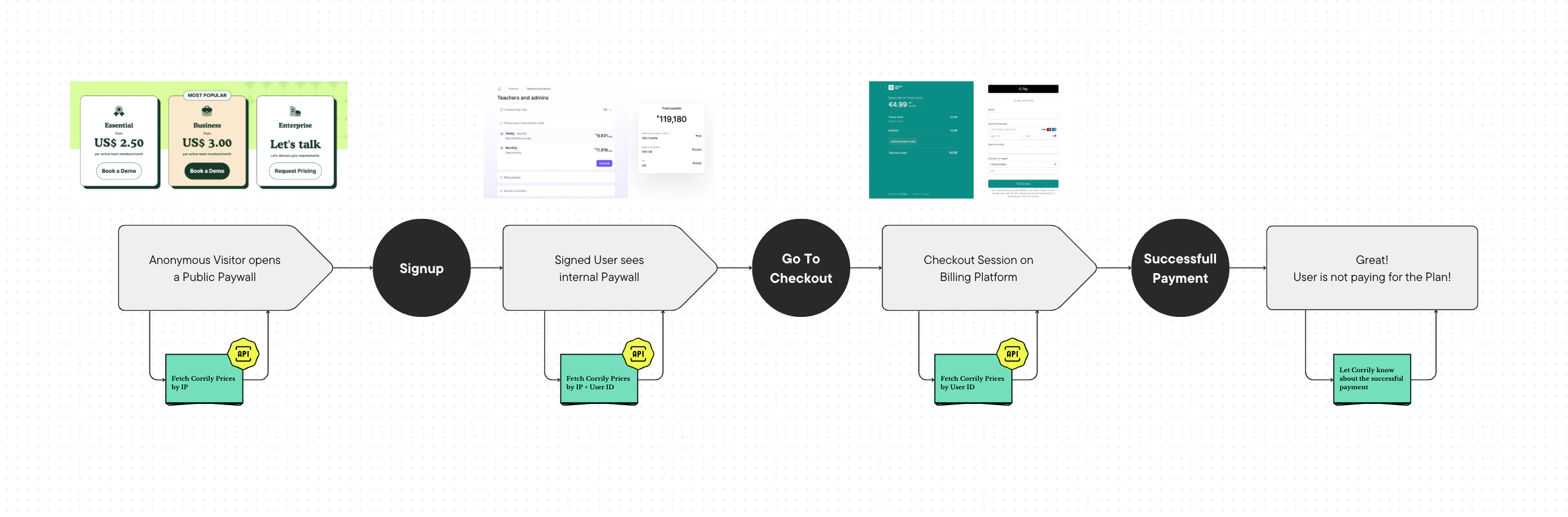
With Corrily your Pricing Page becomes dynamic and controlled by the centralized monetization service.
As a centralized service, Corrily will ensure the following aspects:
* **Config correctness** - Corrily determines User’s country and audience in real-time to let Users see the appropriate prices configured for that country and audience
* **User Experience consistency** - Corrily ensures User will see the same set of plans, prices and currencies across all the places in the product and all the platforms
* **Checkout consistency -** Corrily ensures Users will pay the same price that they have seen
* **Features consistency -** Corrily ensures Users will always see the same set of features available in each plan
Here's a more detailed explanation of the Control Flow with Corrily Platform integrated:
1. **Anonymous Pricing Page**: When a user visits your anonymous pricing page, either your backend or the Corrily Front-End Software Development Kit (FE SDK) sends the user's IP address as a parameter to the **[Price request](/api-reference/calculate-price)**. The request would look like this:
```json theme={null}
{
"ip": "127.0.0.1"
}
```
Corrily then stores the prices served for that IP address. This ensures that if the same Visitor opens a pricing page again, he’ll see the same price.
2. **Internal Paywall**: Once the user signs in and visits the internal paywall, your backend needs to send both the `IP` address and the `user ID` to Corrily. This allows Corrily to associate the `IP` address with the `user ID` and maintain the same price that was previously shown to the unauthenticated Visitor. The request would look like this:
```json theme={null}
{
"ip": "127.0.0.1",
"user_id": "my_user_1"
}
```
If it's not possible to accurately determine the user's `IP` address at the time of visiting the internal paywall, you can associate the user with the `IP` address at the time of signup by sending an [Identify Request](/api-reference/set-user-characteristics) to Corrily with the `IP` address and `user ID`.
1. **Subscription Creation**: When creating a new subscription, you need to pass the price provided by Corrily to the Subscription Management Platform. This is typically done using `Overrides` (refer to the integration guides for each platform for more details)
By passing overrides, you ensure that the user will pay the price they saw, not the price hardcoded in the Subscription Management Platform catalog. This is particularly important during price experimentation, where different users might see different prices for the same plans.
2. **Successful Payment**: After a successful payment, the new subscription and charge rows will be automatically pulled by Corrily via data ingestion pipeline (for OAuth and API-Key integrations), or via webhook, and will appear in analytics on the next iteration of dashboard metrics recalculation.
## Corrily Data Model
### Paywall
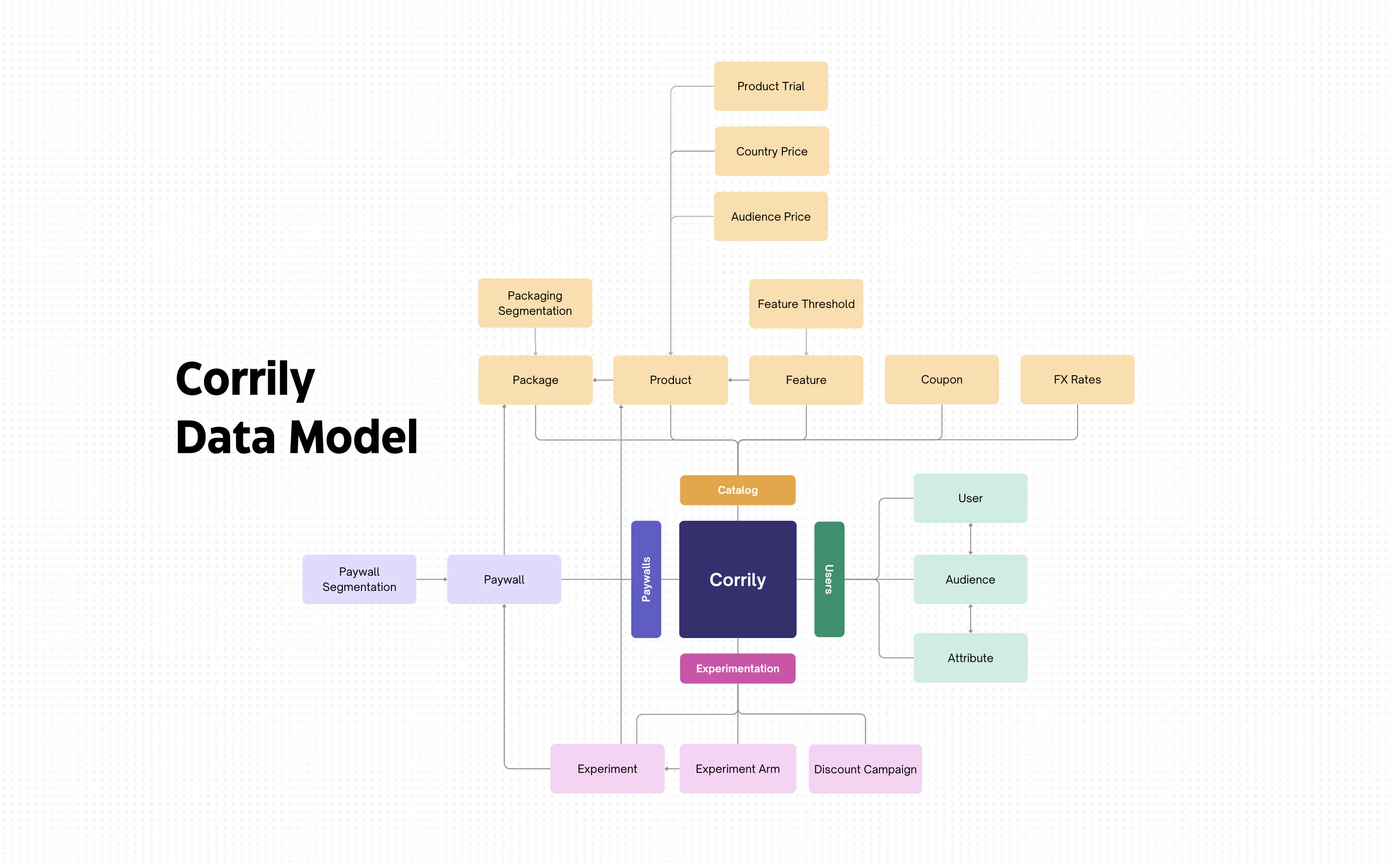
Corrily **Paywall** is a fully functional front-end component, displaying plans, prices, coupons, and other entities from Corrily's Core.
Essentially, it's a payment page, rendered by [front-end SDK](/integrations/02_paywall-integration),
that dynamically displays prices from Corrily's Core for each specific user.
### Package
A Package means a set of plans to be displayed on the [Paywall](#paywall) depending on the user's location or other attributes.
It encapsulates several plans, all of which are displayed on the [Paywall](#paywall).
This abstraction simplifies management of which plan sets to show to which [Audience](#audience) and in which country.
### Product
Corrily **Product** represents a Plan or Addon User might subscribe to.
Typically, Corrily **Products** are mapped 1:1 to Plans or Addons from billing platforms.
### Price
Corrily **Price** is an entity which holds the `amount` and `currency` to be displayed for the selected [Product](#product)
in the selected country for the User's [Audience](#audience).
#### Fixed vs. Ephemeral prices
*The concept of ephemeral prices in Corrily.*
Corrily price can be either **fixed** or **ephemeral**.
#### Fixed Prices
A fixed price is a set *\* pair that is set
via the dashboard, or one of our CRUD API endpoints, and identifiable by a *price\_id* prefixed by `price_`. The amount set will match exactly the
display values returned by Corrily's API.
#### Ephemeral Prices
Ephemeral prices are the product of price transformations applied to fixed prices such as explicit applications of
rounding, calls for the price to be displayed in another currency, coupon applications, or price overrides.
Ephemeral prices too are identifiable by price IDs but these are prefixed by `eph_price_`.
### Trial Period
A **Trial Period** is an entity that allows the addition of a free or paid trial period to a [Product](#product).
The parameters of the **Trial Period** are configured separately from the [Product](#product) itself
and can be experimented with by attempting different **Trials** for different **Products**.
### Coupon
Corrily **Coupon** represents a discount option,
which allows giving a specific User a fixed or percentage discount on a [Product](#product).
Typically **Corrily Coupons** map 1:1 to the coupons on billing platforms.
### Product Feature
Product Feature represents a piece of functionality included into a specific [Product](#product).
Corrily allows to dynamically show different sets of features included into [Products](#product) on the [Paywall](#paywall).
### User
Corrily **User** represents physical person, who can see the price and can have one or several subscriptions,
each subscription comprises one or several products.
Typically Corrily **User** maps 1:1 to billing platform **Customer**.
### User Attribute
Corrily might store any custom metadata **Attributes** assigned to a [User](#user).
Those attribute values can be used to define [Audiences](#audience) by a variety of rules.
### Audience
Corrily allows to segment [Users](#user) based on the rules on top of [User Attributes](#user-attribute).
### Experiment
An **Experiment** is a single A-B-test, or Bayesian test, allowing comparison of different [Packages](#package),
[Prices](#price), striked "old" prices, [Trial Periods](#trial-period), discounts, [Features](#user-feature),
and other pricing attributes User can see.
 The Corrily Platform is designed to control and optimize almost every aspect of Pricing
and Monetization for subscription-based businesses. Its architecture consists of several key components,
including Pricing API, Analytics dashboard and Integrations.
### Paywall Builder
With Corrily, your pricing page becomes dynamic and remotely-configured, eliminating the need
for hardcoded prices. The content of the Pricing Page (including sets of plans to display, prices itself,
currencies, discounts, trial info, etc) will be fetched via API, which can be consumed either
by your back-end code or directly from the front-end or Mobile App using Corrily's SDKs.
That approach enables a personalized and dynamic pricing experience for each user.
### Price Management and Price Experimentation
Corrily serves as an external “admin panel” that controls your prices, acting
as a source of truth for pricing and monetization. It allows you to configure and immediately
apply every aspect of subscription monetization through the Corrily dashboard.
On each API call, the platform dynamically determines the country and audience of the User,
deciding if the User falls into an active experiment, and then responds with the appropriate
pricing page content for that User.
The Corrily Platform is designed to control and optimize almost every aspect of Pricing
and Monetization for subscription-based businesses. Its architecture consists of several key components,
including Pricing API, Analytics dashboard and Integrations.
### Paywall Builder
With Corrily, your pricing page becomes dynamic and remotely-configured, eliminating the need
for hardcoded prices. The content of the Pricing Page (including sets of plans to display, prices itself,
currencies, discounts, trial info, etc) will be fetched via API, which can be consumed either
by your back-end code or directly from the front-end or Mobile App using Corrily's SDKs.
That approach enables a personalized and dynamic pricing experience for each user.
### Price Management and Price Experimentation
Corrily serves as an external “admin panel” that controls your prices, acting
as a source of truth for pricing and monetization. It allows you to configure and immediately
apply every aspect of subscription monetization through the Corrily dashboard.
On each API call, the platform dynamically determines the country and audience of the User,
deciding if the User falls into an active experiment, and then responds with the appropriate
pricing page content for that User.
 Before Corrily, companies typically use this simple setup:
* Paywall Plans and Prices are hardcoded on the front-end, or stored in the database
* Checkout prices are configured on the billing platform catalog
That means any update requires engineering effort, at least on the billing engineering side,
and, optionally, on front-end.
Also, that means there are risks of different types of inconsistencies.
### Control Flow with Corrily
Before Corrily, companies typically use this simple setup:
* Paywall Plans and Prices are hardcoded on the front-end, or stored in the database
* Checkout prices are configured on the billing platform catalog
That means any update requires engineering effort, at least on the billing engineering side,
and, optionally, on front-end.
Also, that means there are risks of different types of inconsistencies.
### Control Flow with Corrily
 With Corrily your Pricing Page becomes dynamic and controlled by the centralized monetization service.
As a centralized service, Corrily will ensure the following aspects:
* **Config correctness** - Corrily determines User’s country and audience in real-time to let Users see the appropriate prices configured for that country and audience
* **User Experience consistency** - Corrily ensures User will see the same set of plans, prices and currencies across all the places in the product and all the platforms
* **Checkout consistency -** Corrily ensures Users will pay the same price that they have seen
* **Features consistency -** Corrily ensures Users will always see the same set of features available in each plan
Here's a more detailed explanation of the Control Flow with Corrily Platform integrated:
1. **Anonymous Pricing Page**: When a user visits your anonymous pricing page, either your backend or the Corrily Front-End Software Development Kit (FE SDK) sends the user's IP address as a parameter to the **[Price request](/api-reference/calculate-price)**. The request would look like this:
```json theme={null}
{
"ip": "127.0.0.1"
}
```
Corrily then stores the prices served for that IP address. This ensures that if the same Visitor opens a pricing page again, he’ll see the same price.
2. **Internal Paywall**: Once the user signs in and visits the internal paywall, your backend needs to send both the `IP` address and the `user ID` to Corrily. This allows Corrily to associate the `IP` address with the `user ID` and maintain the same price that was previously shown to the unauthenticated Visitor. The request would look like this:
```json theme={null}
{
"ip": "127.0.0.1",
"user_id": "my_user_1"
}
```
If it's not possible to accurately determine the user's `IP` address at the time of visiting the internal paywall, you can associate the user with the `IP` address at the time of signup by sending an [Identify Request](/api-reference/set-user-characteristics) to Corrily with the `IP` address and `user ID`.
1. **Subscription Creation**: When creating a new subscription, you need to pass the price provided by Corrily to the Subscription Management Platform. This is typically done using `Overrides` (refer to the integration guides for each platform for more details)
By passing overrides, you ensure that the user will pay the price they saw, not the price hardcoded in the Subscription Management Platform catalog. This is particularly important during price experimentation, where different users might see different prices for the same plans.
2. **Successful Payment**: After a successful payment, the new subscription and charge rows will be automatically pulled by Corrily via data ingestion pipeline (for OAuth and API-Key integrations), or via webhook, and will appear in analytics on the next iteration of dashboard metrics recalculation.
## Corrily Data Model
With Corrily your Pricing Page becomes dynamic and controlled by the centralized monetization service.
As a centralized service, Corrily will ensure the following aspects:
* **Config correctness** - Corrily determines User’s country and audience in real-time to let Users see the appropriate prices configured for that country and audience
* **User Experience consistency** - Corrily ensures User will see the same set of plans, prices and currencies across all the places in the product and all the platforms
* **Checkout consistency -** Corrily ensures Users will pay the same price that they have seen
* **Features consistency -** Corrily ensures Users will always see the same set of features available in each plan
Here's a more detailed explanation of the Control Flow with Corrily Platform integrated:
1. **Anonymous Pricing Page**: When a user visits your anonymous pricing page, either your backend or the Corrily Front-End Software Development Kit (FE SDK) sends the user's IP address as a parameter to the **[Price request](/api-reference/calculate-price)**. The request would look like this:
```json theme={null}
{
"ip": "127.0.0.1"
}
```
Corrily then stores the prices served for that IP address. This ensures that if the same Visitor opens a pricing page again, he’ll see the same price.
2. **Internal Paywall**: Once the user signs in and visits the internal paywall, your backend needs to send both the `IP` address and the `user ID` to Corrily. This allows Corrily to associate the `IP` address with the `user ID` and maintain the same price that was previously shown to the unauthenticated Visitor. The request would look like this:
```json theme={null}
{
"ip": "127.0.0.1",
"user_id": "my_user_1"
}
```
If it's not possible to accurately determine the user's `IP` address at the time of visiting the internal paywall, you can associate the user with the `IP` address at the time of signup by sending an [Identify Request](/api-reference/set-user-characteristics) to Corrily with the `IP` address and `user ID`.
1. **Subscription Creation**: When creating a new subscription, you need to pass the price provided by Corrily to the Subscription Management Platform. This is typically done using `Overrides` (refer to the integration guides for each platform for more details)
By passing overrides, you ensure that the user will pay the price they saw, not the price hardcoded in the Subscription Management Platform catalog. This is particularly important during price experimentation, where different users might see different prices for the same plans.
2. **Successful Payment**: After a successful payment, the new subscription and charge rows will be automatically pulled by Corrily via data ingestion pipeline (for OAuth and API-Key integrations), or via webhook, and will appear in analytics on the next iteration of dashboard metrics recalculation.
## Corrily Data Model
 ### Paywall
Corrily **Paywall** is a fully functional front-end component, displaying plans, prices, coupons, and other entities from Corrily's Core.
Essentially, it's a payment page, rendered by [front-end SDK](/integrations/02_paywall-integration),
that dynamically displays prices from Corrily's Core for each specific user.
### Package
A Package means a set of plans to be displayed on the [Paywall](#paywall) depending on the user's location or other attributes.
It encapsulates several plans, all of which are displayed on the [Paywall](#paywall).
This abstraction simplifies management of which plan sets to show to which [Audience](#audience) and in which country.
### Product
Corrily **Product** represents a Plan or Addon User might subscribe to.
Typically, Corrily **Products** are mapped 1:1 to Plans or Addons from billing platforms.
### Price
Corrily **Price** is an entity which holds the `amount` and `currency` to be displayed for the selected [Product](#product)
in the selected country for the User's [Audience](#audience).
#### Fixed vs. Ephemeral prices
*The concept of ephemeral prices in Corrily.*
Corrily price can be either **fixed** or **ephemeral**.
#### Fixed Prices
A fixed price is a set *\
### Paywall
Corrily **Paywall** is a fully functional front-end component, displaying plans, prices, coupons, and other entities from Corrily's Core.
Essentially, it's a payment page, rendered by [front-end SDK](/integrations/02_paywall-integration),
that dynamically displays prices from Corrily's Core for each specific user.
### Package
A Package means a set of plans to be displayed on the [Paywall](#paywall) depending on the user's location or other attributes.
It encapsulates several plans, all of which are displayed on the [Paywall](#paywall).
This abstraction simplifies management of which plan sets to show to which [Audience](#audience) and in which country.
### Product
Corrily **Product** represents a Plan or Addon User might subscribe to.
Typically, Corrily **Products** are mapped 1:1 to Plans or Addons from billing platforms.
### Price
Corrily **Price** is an entity which holds the `amount` and `currency` to be displayed for the selected [Product](#product)
in the selected country for the User's [Audience](#audience).
#### Fixed vs. Ephemeral prices
*The concept of ephemeral prices in Corrily.*
Corrily price can be either **fixed** or **ephemeral**.
#### Fixed Prices
A fixed price is a set *\